[PR]上記の広告は3ヶ月以上新規記事投稿のないブログに表示されています。新しい記事を書く事で広告が消えます。
After the release of Netgear Aircard 810s, Netgear then presents the fastest mobile WiFi hotspot Nighthawk M1. The two mobile WLAN hotspots are well-known because they are with very fast LTE modems, which makes Netgear Wireless dominates the wireless gadgets equipment. Based on Qualcomm high-level chipset, the AirCard 810 Hotspot can achieve downlink up to 600 Mbit/s while the Nighthawk M1 can even reach up to 1 GBit/s in the downlink. The Nighthawk M1 also has the advanced features, but even the AirCard 810 hotspot has its advantages, as this comparison shows.
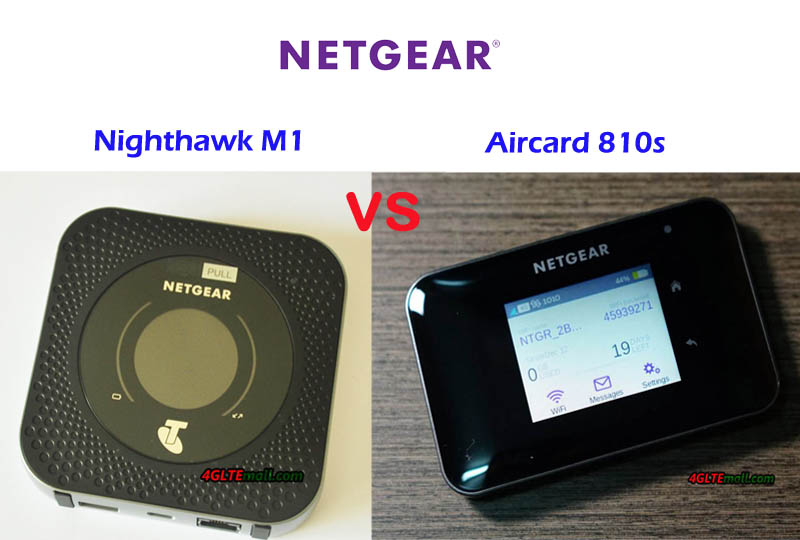
The Netgear AirCard 810 LTE Router has been available in many countries for a few years. When it’s first available in the market, it’s the fastest LTE hotspot (LTE Cat11, up to 600 Mbit/s). In our test, the AC810 proves its ability for wireless connection. The Netgear Nighthawk M1 is to be regarded as a direct successor to the AirCard 810 hotspot and has been officially available in the market since the second half of 2017. However, the concept of the AirCard series was only partially continued, and the Nighthawk open a new series for Netgear LTE advanced Pro gadgets.
The design of the two Netgear LTE hotspots is very different. The AirCard 810 router is significantly smaller than the Nighthawk M1, but still comparatively large for a mobile LTE hotspot. The big touchscreen display on the front of the AC810 catches the eye. The Nighthawk M1 also has a very eye-catching display, but the round screen has no touch function. On the display, the AirCard 810 router seems has more advantages.
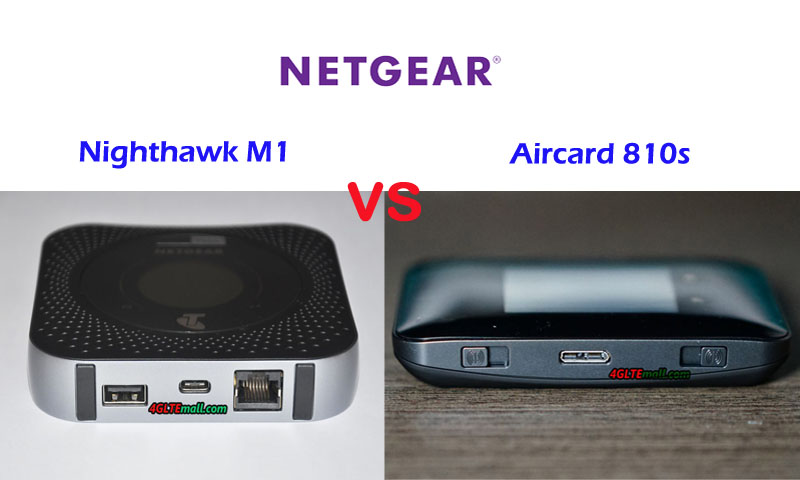
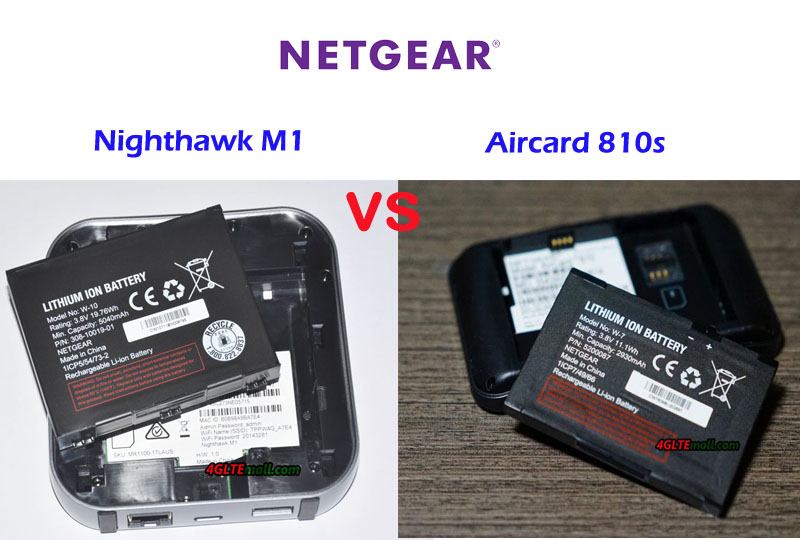
In terms of connections, the Nighthawk M1 mobile router is far ahead than Aircard 810. In addition to USB Type C for charging and connecting to the computer, the M1 offers a standard USB port for use as a power bank (charging other devices) as well as an RJ45 Gigabit Ethernet LAN port. Both WLAN hotspots are equipped with two TS-9 connections, to which an external mobile radio antenna can be connected. The battery is changeable in both devices; the Nighthawk M1 has a much stronger battery of 5040mAh, compared with the AC810 2930mAh battery capacity. In addition, the two mobile routers use SIM size in Micro SIM card.
On the datasheet, the Qualcomm LTE modem in the Netgear Nighthawk M1 is significantly more powerful than the AirCard 810 router. The Nighthawk M1 not only supports up to fourfold channel bundling (4CC CA), but also the 4 × 4 MIMO antenna technology. The AirCard 810 Router can handle a maximum of three carrier aggregation and 2 × 2 MIMO. The 256QAM modulation is available in both two routers.
In practice, the maximum speed was limited more by the mobile network than by the router, so there were hardly any differences between the two devices (tested with unlimited rates from Vodafone and Telekom). However, there were differences in "simple" LTE reception without channel bundling. Here, the Nighthawk M1 was often a little faster on the go. Even in the UMTS network, the Nighthawk M1 has usually made a little faster speed in the downlink than the AC810. By the way, GSM/2G cannot be handled in both hotspots.
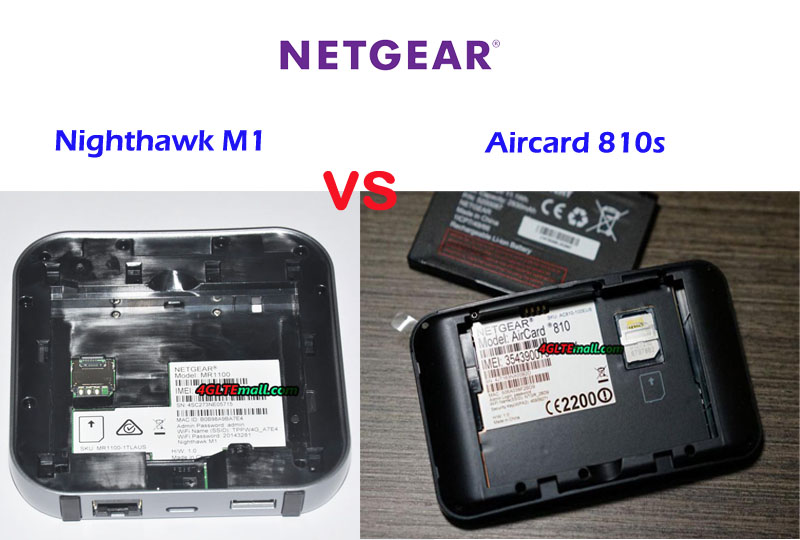
The Netgear Nighthawk M1 offers the slightly better wireless network performance compared to the AirCard 810 router and the slightly better gross data rates, as shown by the test with multiple devices. Both devices support WLAN at dual-band 2.4 GHz and 5 GHz. There is a difference in the maximum number of devices simultaneously connected via WLAN: up to 20 simultaneous users are possible with the Nighthawk M1, only 15 with the AC810. Both the Netgear AC810 and the Netgear Nighthawk M1 offer a so-called offload function, also known as "WLAN Extender". As an alternative to the integrated mobile modem, the user can use an existing WLAN connection as Internet access. In the case of the Nighthawk M1, Internet access can alternatively also be established via the RJ45 LAN interface. The offload function is particularly interesting in hotels, at events or in the home and can help to save data volume on the mobile rate.
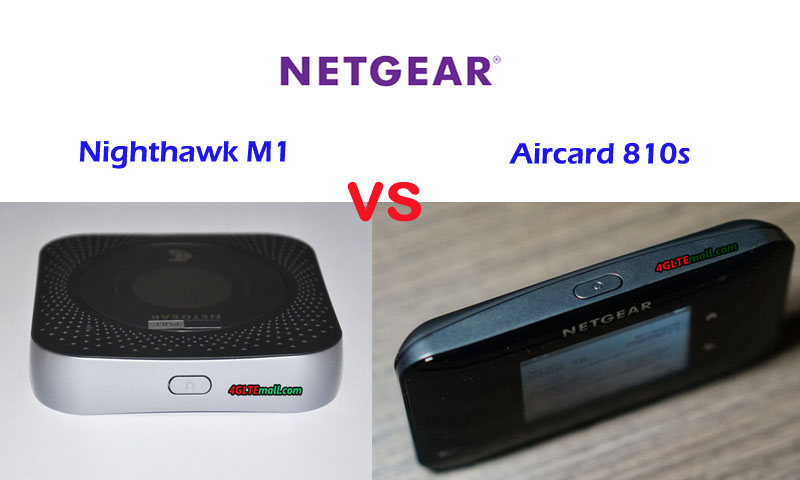
In terms of operation and configuration, the two Netgear LTE routers differ only minimally. Of course, the AirCard 810 hotspot offers the advantage of the touchscreen display, so some settings can be made conveniently directly on the router. With the Nighthawk M1, you either have to call up the web interface via a browser or use the Netgear Mobile App (available for Android and iOS). If you want to change the AC810 more than just basic things, you have to use the web interface or the app there as well.
The web interface offers a bit more features compared to the Netgear Nighthawk M1, but the AC810 is by no means badly positioned here. Both devices are easy and uncomplicated to use, the app is suitable for less technically savvy users, maybe even better for the operation than the web interface.
In direct comparison, the Nighthawk M1 is clearly the better router. The modem is better and provides for higher data rates than average, there is an RJ45 LAN connection and the battery has been improved significantly compared to the AirCard 810 again. The waiver of a touch screen is a pity, even though, it’s still given the high price of around 459.00USD. With WLAN, the Nighthawk M1 also offers advantages over the AC810, the range is slightly better and the data rates are higher in many situations.
Anyone who is prepared to pay the currently quite high price, clearly gets the better mobile hotspot Nighthawk M1. But the AirCard 810 router is still far from being old-fashioned: Compared to the Nighthawk M1, the 810s aircard offers a more compact and pocket-compatible size and can be operated via touchscreen. You do not have to know too much about the technology, the software is largely identical. For around 250USD, you will not get disappointed with the AC810.
A few years ago, Huawei presented its first mobile 3G router with Ethernet port Huawei E5151 (In China, it’s called Huawei E5 LAN). Now many mobile hotspots with Ethernet connection are available from many vendors. Today, we would like to review five Huawei mobile hotspots with Ethernet port, including Huawei 3G mobile WiFi hotspot with Ethernet port and Huawei 4G Mobile WiFi Hotspots with Ethernet Port.
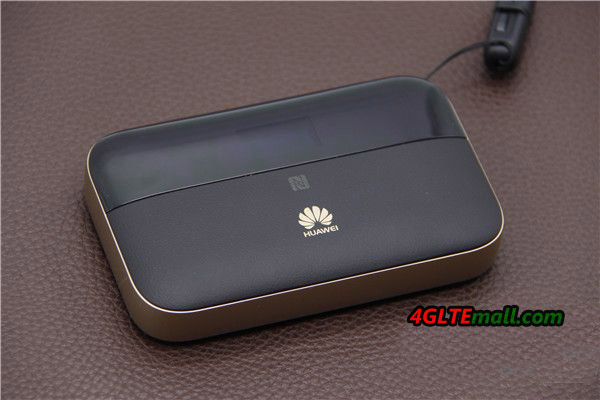
Huawei E5885[/caption] Why people need a 3G/4G hotspot with Ethernet port? Usually, many people use 3G mobile hotspots or 4G mobile hotspots on the go. The mobile hotspots usually have a SIM card slot, so that users can connect to the hotspot wirelessly. However, if the SIM card signal is not available or only Ethernet connection is available, it’s the show time for the mobile hotspot with Ethernet port. And the business people or somebody who usually travel overseas may face this trouble. In this situation, you may need a 3G/4G LTE hotspot with Ethernet port. Best Seller – Huawei 3G/4G Mobile Hotspot with Ethernet Port
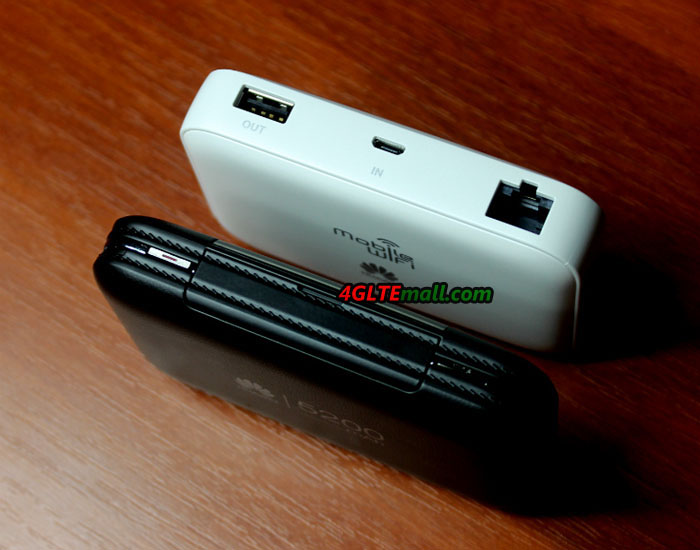 Huawei E5770 in black and Huawei E5730 in white
From the name, you may don’t know what the difference is between the five mobile hotspots with Ethernet port. The Huawei E5885 and E5770 are two 4G mobile hotspots with Ethernet port while the rest three models(E5730, E5351 and E5151) are 3G mobile hotspots. We make the table below about the specs and features of the five mobile routers for your reference. Let’s see the Huawei 4G mobile hotspots with Ethernet port:
|
Huawei 4G Mobile WiFi Hotspot with Ethernet Port |
||
| Model | Huawei E5885 | Huawei E5770 |
| Product type | LTE Mobile Hotspot | LTE Mobile Hotspot |
| Category | LTE Cat.6 | LTE Cat.4 |
| Data rates | DL 300Mbps/UL 50Mbps | DL 150Mbps/UL 50Mbps |
| Supported 4G LTE frequency bands | * FDD-LTE: Band 1/2/3/4/5/7/8/19/20/28 * TDD-LTE: Band 38/40/41/42 | Band 1/3/5/7/8/20/38 |
| Supported 3G frequency bands | B1/B2/B4/B5/B6/B8/B19 | 850/900/1900/2100MHz |
| WiFi | 802.11a/b/g/n/ac, dual-band 2.4GHz & 5GHz | 802.11b/g/n, 2.4GHz |
| Max support users | 32 users | 11 users |
| MIMO | 2 X 2 MIMO | 2 X 2 MIMO |
| Connector for external antenna | No connector | No connector |
| Ethernet Port | Single WAN/LAN port(RJ-45) | Single WAN/LAN port(RJ-45) |
| App management | Huawei Hilink APP | Huawei Hilink APP |
| SIM type | Micro SIM | Micro SIM |
| Battery | Non-removable, 6400mAh | Non-removable, 5200mAh |
| Dimensions | 112.00 x 69.20 x 23.00mm | 106.0 mm × 68.4 mm × 22.5 mm |
| USB port | Input & Output | Input & Output |
| Datasheet | Huawei E5885 Datasheet | Huawei E5770 Datasheet |
| User Manual | Huawei E5885 Manual | Huawei E5770 Manual |
| Supported Carriers | AT&T, T-mobile, Verizon, Rogers, Telus, Telstra, Vodafone, Orange, Airtel, MTC, MTN, Vodacom etc.. Including other carriers in Europe, Africa, Middle East, Aisa. | Mainly for Europe, Asia, Middle East, Africa, not working well in American areas on 4G/LTE |
| Review | Huawei E5885 Review | Huawei E5770 Review |
| Price/USD | 299.00USD | 229.00 |
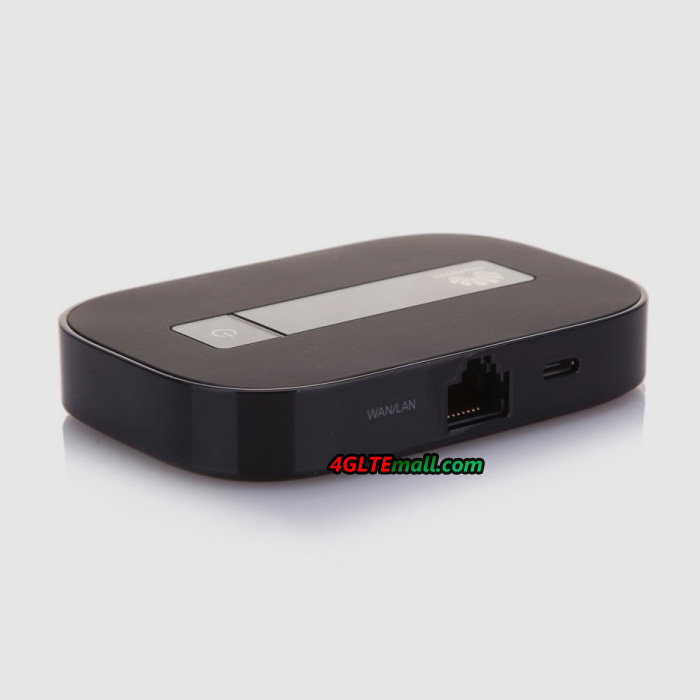 Huawei E5351
And below is the Huawei 3G Mobile WiFi Hotspot with Ethernet Port:
|
Huawei 3G Mobile Hotspot with Ethernet Port |
|||
| Model | Huawei E5730 | Huawei E5351 | Huawei E5151 |
| Product type | 3G Mobile Hotspot | 3G Mobile Hotspot | 3G Mobile Hotspot |
| Data rates | DL 42Mbps/UL 5.76Mbps | DL 42Mbps/UL 5.76Mbps | DL 21Mbps/UL 5.76Mbps |
| Supported 4G LTE frequency bands | n/a | n/a | n/a |
| Supported 3G frequency bands | 900/2100MHz | 900/2100MHz | 900/2100MHz |
| WiFi | 802.11b/g/n, 2.4GHz | 802.11b/g/n, 2.4GHz | 802.11b/g/n, 2.4GHz |
| Max support users | 10 users | 10 users | 10 users |
| MIMO | n/a | n/a | n/a |
| Connector for external antenna | No connector | No connector | No connector |
| Ethernet Port | Single WAN/LAN port(RJ-45) | Single WAN/LAN port(RJ-45) | Single WAN/LAN port(RJ-45) |
| App management | Huawei Hilink APP | Huawei Hilink APP | Huawei Hilink APP |
| SIM type | Standard SIM | Standard SIM | Standard SIM |
| Battery | Non-removable, 5200mAh | Removable, 1500mAh | Removable, 1500mAh |
| Dimensions | 99.0mm×66.3mm×22.5mm | 92.8mm x 63.5mm x 16.3mm | 92.8mm x 63.5mm x 16.3mm |
| USB port | Input & Output | Input | Input |
| Datasheet | Huawei E5730 Datasheet | Huawei E5351 Datasheet | Huawei E5151 Datasheet |
| User Manual | Huawei E5730 Manual | Huawei E5351 Manual | Huawei E5151 Manual |
| Supported Carriers | Mainly for Europe, Asia, Middle East, Africa, not working well in American areas on 4G/LTE | Mainly for Europe, Asia, Middle East, Africa, not working well in American areas on 4G/LTE | Mainly for Europe, Asia, Middle East, Africa, not working well in American areas on 4G/LTE |
| Review | Huawei E5730 Review | Huawei E5351 Review | Huawei E5151 Review |
| Price/USD | 148.00 | 139.00 | 139.00 |
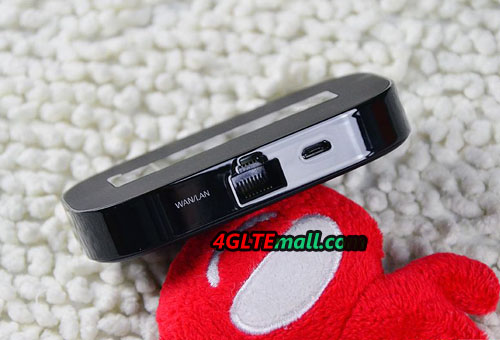
Huawei E5151
They are the best sellers of Huawei Mobile Hotspots with Ethernet port. The Ethernet Port in the devices is for WAN & LAN. Here now, there are many mobile hotspots with Ethernet from other manufacturers, but some of them are only for LAN, not for WAN, which means you can only connect to the network via 4G SIM card. You cannot connect to WLAN network via Ethernet port.
The above mobile hotspots with Ethernet port support LTE to LTE-A networks, and 3G mobile hotspots available. You may find one for yourself if you have demand for such functions. And we have to mention that the large battery capacity in the Huawei E5885, E5770, and E5730, which can also charge other devices such as smartphones, gadgets etc…This could also be praised for the practical function.
Till the November 2017, Netgear Nighthawk M1 was always the fastest 4G LTE Pocket WiFi in the market. With the support of download speed of 1Gigabit per second and 150Mbps for upload, Netgear Nighthawk M1 is very popular in the users who are looking for high-speed terminals to work with LTE advanced Pro networks. With the release of a new 4G LTE Mobile Hotspot Huawei E5788, Netgear Nighthawk M1 has a challenging competitor.
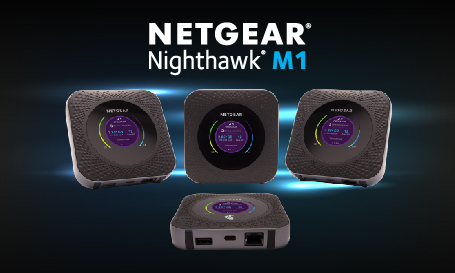
Huawei E5 mobile hotspots are always the most popular wireless routers all over the world. Now the most advanced Huawei E5788 comes with Huawei advanced LTE technology. Today we will have a look at what the new LTE hotspot bring to us and what’s the difference between the two Gigabit LTE mobile routers.
Appearance If you already have known the Netgear Nighthawk M1, you may know the Netgear Nighthawk M1 is in a square shape with LAN port. The Huawei E5788 doesn’t have the LAN port, it seems to be upgraded from the Huawei E5786 LTE cat6 mobile hotspot. Huawei E5788 has a 2.4-inch color touchscreen to show the information about the connection in square shape while Netgear Nighthawk M1 has also same size screen but in round shape. The power button of Netgear Nighthawk M1 is to switch the menu.
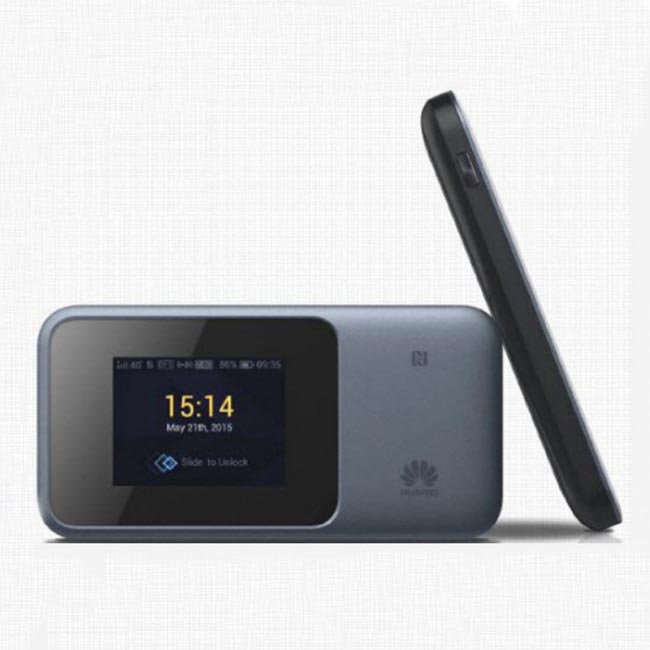
The SIM card slot of Huawei E5788 is at the side of the device while the Nighthawk M1 design the SIM card slot in the inner part under the battery, which is similar to the predecessor Netgear Aircard 810s. They both have two TS-9 connectors for external 4G LTE antenna in case of use in weak signal areas.
Battery The Huawei E5788 has a built-in battery of 3000mAh while the Netgear Nighthawk M1 has a removable battery of 5040mAh. What’s more, the Nighthawk M1 can charge other electric devices on the large battery. Whether the Huawei E5788 has the same function is not mentioned by the official sayings. Technical Specifications We summarize the main technical features of the two high-level LTE mobile routers as below:
| Model | Huawei E5788u-96a | Netgear Nighthawk M1 |
| Product type | LTE Mobile Hotspot | LTE Mobile Hotspot |
| Category | LTE Cat.16 | LTE Cat.16 |
| Chipset | Qualcomm MDM9250 | Qualcomm MDM9x50 |
| Data rates | DL 1Gbps/UL 100Mbps | DL 1Gbps/UL 100Mbps |
| Supported 4G LTE frequency bands | * FDD-LTE: Band 1/2/3/4/5/7/8/19/20/28 * TDD-LTE: Band 38/40/41/42 | -- Telstra Nighthawk: Band 1/3/7/8/28 -- AT&T Nighthawk: Band 1/2/3/4/5/7/12/29/30/66 |
| WLAN | 802.11a/b/g/n/ac, dual-band 2.4GHz & 5GHz | 802.11a/b/g/n/ac, dual-band 2.4GHz & 5GHz |
| Max support users | 32 users | 20 users |
| MIMO | 4 X 4 MIMO | 4 X 4 MIMO |
| Connector for external antenna | No connector | Two, TS-9 jacks |
| Buy Antenna | N/A | Netgear Nighthawk M1 Antenna |
| App management | Huawei Hilink APP | Netgear Aircard APP |
| SIM type | Micro SIM | Micro SIM |
| Battery | Non-removable, 3000mAh | Removable, 5040 mAh |
| Dimensions | 129 x 65 x 13.5mm | 105.5 x 105.5 x 20.35 mm |
| Ethernet Port | No | On port for LAN port(RJ-45) |
| Datasheet download | Huawei E5788 Datahseet | Netgear Nighthawk M1 Datasheet |
| User Manual | Huawei E5788 Manual | Netgear Nighthawk M1 Manual |
| Other features | 4CC CA | 4 band CA, JumpBoost |
| Firmware download | Huawei E5788 Firmware | Nighthawk M1 Firmware |
| Drivers | Huawei E5788 Driver | Nighthawk M1 Driver |
| Reviews | Huawei E5788 Review | Netgear Nighthawk M1 AT&T Review |
| Price | 499.00USD | 459.00USD |
From the technical specifications, we can see the two Gigabit LTE routers have very similar functions. The supported LTE frequency bands are different for various LTE networks in different areas. Here now, the Netgear Nighthawk M1 is available in the market and has gained a very good reputation. The Huawei E5788u-96a(first released model) is not yet available. But we suppose it would be available son around the beginning of 2018. And who will be the winner, the market will tell.
More and more network providers worldwide are upgrading their networks to LTE Advanced LTE-A Pro. So the end-users of the wireless devices are also demanding the higher-level LTE equipment. Huawei had supplied many LTE Cat.3 and Cat.4 routers to the network providers. And now the Huawei LTE advanced and LTE-A pro routers are becoming more and more popular. Huawei B315 and Huawei E5186 are two typical Huawei 4G wireless Routers ; However, many people do not know what the difference between LTE wireless routers is. Today, we will check what is the difference between them and which one is better.
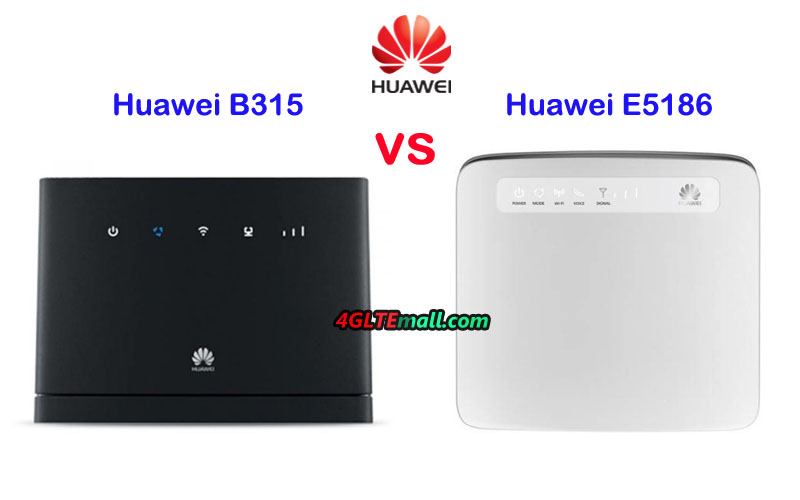
Huawei E5186 Huawei VS B315 Appearance and Interfaces
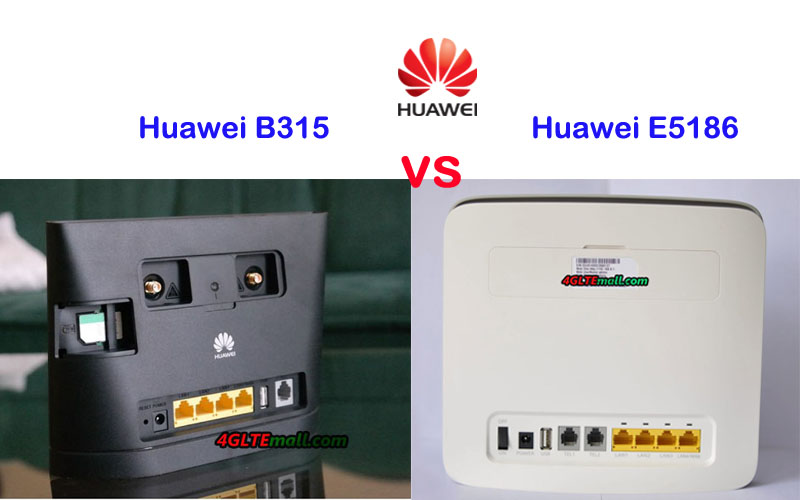
Huawei B315 and E5186 LTE CPE are both traditional stationary router. On the front, there are few LED indicators such as Power, mode, WiFi, signal and Voice (on E5186). On the back, there are 4 LAN ports (One for LAN/WAN), One USB2.0 port, and two connectors for an external antenna. The Huawei B315s-22 has only one telephone port while Huawei E5186 modem has two telephone ports and has voice indicator on the front. The connectors in the two routers for the external antenna are SMA type. If you would buy Huawei B315 external antenna, you can refer to the 4G LTE Outdoor Antenna with two SMA connectors. The antenna could also be used with Huawei E5186 LTE Router.
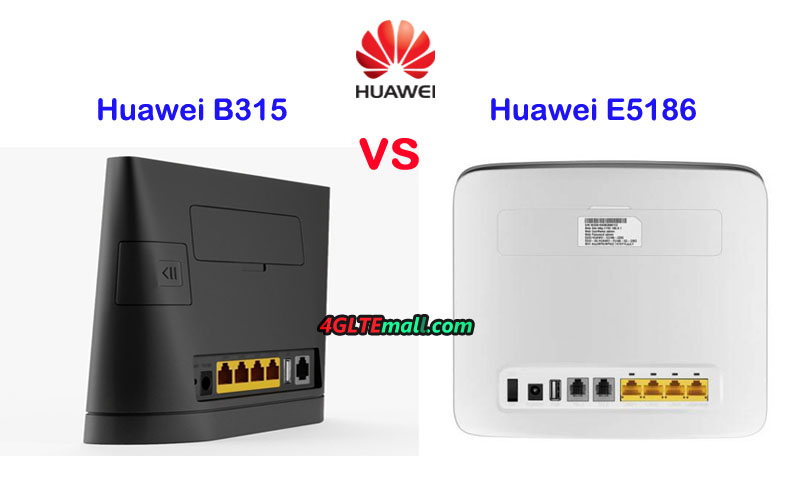
The Huawei E5186 WiFi router uses Micro SIM card, while Huawei B315 uses Standard SIM card. The SIM card slot of Huawei E5186 modem is located at the edge side while the B315 LTE CPE SIM slot is at the back. The label of the B315 router is at the bottom side while the Huawei E5186 router label is located between the two external antenna connectors.
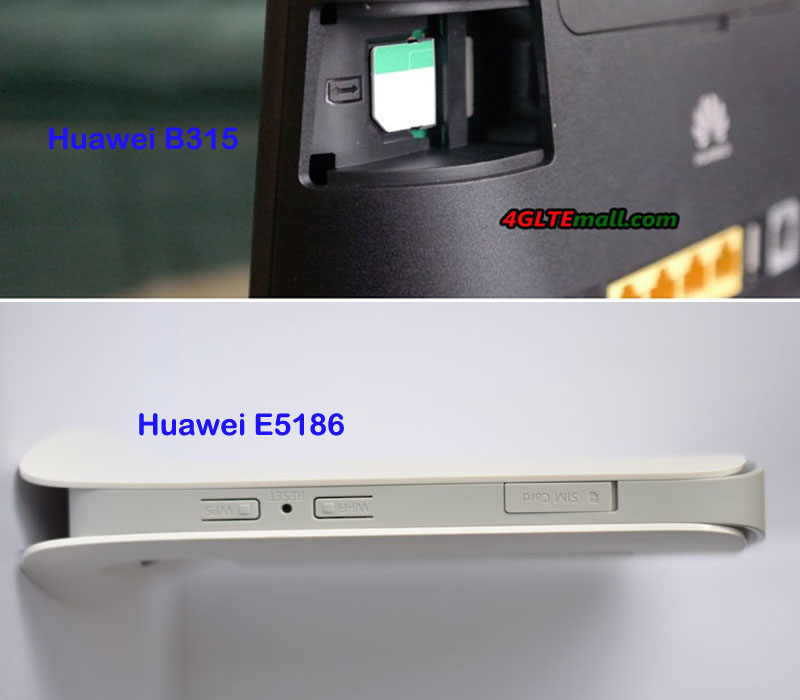
Huawei B315 VS Huawei E5186 Specs and Variant models
To meet the various LTE frequency bands from different network providers, the Huawei E5186 modem and B315 LTE CPE both have variant models. Huawei E5186 has two sub-models now: E5186s-22a and E5186s-61a. The Huawei B315 LTE CPE has more variant models: B315s-22, B315s-607, B315s-936, B315s-608 etc...The interfaces may vary on the variant models. From the appearance and interfaces, we can’t find which one is better. In the table below, the Huawei E5186 specs and Huawei B315s specs are listed, which are the key of the LTE features.
| Model | Huawei B315s | Huawei E5186 |
| Product type | LTE WiFi Router with Ethernet port | LTE WiFi Router |
| Category | LTE Cat.4 | LTE Cat.6 |
| Chipset | Hisilicon Balong | HiSilicon LTE Cat6 Chipset |
| Data rates | DL 150Mbps/UL 50Mbps | DL 300Mbps/UL 50Mbps |
| Supported 4G LTE frequency bands | * Huawei B315s-22: 4G LTE B1/B3/B7/B8/B20/B38 * Huawei B315s-607: 4G Band 1/3/7/8/28/40 * Huawei B315s-936: 4G Band 1/3/40/41 * Huawei B315s-608: 4G Band 1/3/5/7/28 | Huawei E5186s-22a: Band 1/3/7/8/20/38 Huawei E5186s-61a: Band 3/7/28/40 |
| WLAN | 802.11b/g/n, 2.4GHz | 802.11a/b/g/n/ac, dual-band 2.4GHz & 5GHz |
| Max supported users | 32 users | 64 users |
| MIMO | n/a | 2 x 2 MIMO |
| Connector for external antenna | Two, SMA-female jacks | Two, SMA-female jacks |
| Buy Antenna | Huawei B315 external antenna | Huawei E5186 external antenna |
| App management | Huawei Hilink APP | Huawei Hilink APP |
| SIM Size | Standard SIM | Micro SIM |
| Battery | No | NO |
| Dimensions | 186.0mm x 139.0mm x 46.0mm | 190 mm × 200 mm × 32 mm |
| Interfaces | * 1 x power adapter port * 3 x LAN port(RJ45) * 1 x LAN/WAN port (45) * 1 x telephone port(RJ11)(depends) * Two external LTE antenna ports (SMA-J1.5) * One SIM card slot * 1 x USB 2.0 port(depends) | * 3 x LAN port(45) * 1 x LAN/WAN port (45) * 2 x telephone port(RJ11) * Two external LTE antenna ports (SMA-J1.5) * One micro-SIM card slot * 1 x USB 2.0 port |
| Datasheet | Huawei B315 Datasheet(PDF) | Huawei E5186 Datasheet(PDF) |
| User Manual | Huawei B315 Manual(PDF) | Huawei E5186 User Manual(PDF) |
| Other features | VoIP, DHCP, NAT, IPv6/IPv4 dual stack, Firewall, Port forwarding, DMZ, ALG, Remote management | Firewall, CS Voice, VoIP, TR069 Remote Management, HTTP Online Upgrade, QoS, USB Share, UPnP, IPV6, DLNA, Fax, Print, VPN |
| Firmware download | Huawei B315s Firmware | Huawei E5186 firmware |
| Driver | Huawei B315s driver | Huawei E5186 driver |
| Reviews | Huawei B315 Review | Huawei E5186 Review |
| Price/USD | 169.00 | 259.00USD |
Conclusion
Huawei B315 has more variant models than Huawei E5186. And the sub-models cover more frequency bands and have more band combination than Huawei E5186 two variant models. However, as we can see in the table, the Huawei E5186 could support peak download speed up to 300mbps, which is almost the double speed than that of B315 LTE CPE. With carrier aggregation and LTE Cat.6 chipset, Huawei E5186 would support maximum up to 64 wireless users while Huawei B315 would support only 32 users. So the Huawei E5186 price would be higher than Huawei B315 price. Huawei E5186 is more advanced for LTE advanced networks. So if you want to buy a Huawei 4G Router with faster speed, Huawei E5186 would be the right one. If you just need a router with decent speed and price is also concerned, Huawei B315 should be considered.
With the development of LTE networks, LTE Advanced is now becoming the mainstream. So the LTE-A WiFi Routers are more and more popular, which would provide faster speed than that on LTE category 3 or LTE category 4. Huawei E5186 is the world’s first LTE-A router and was very popular in 2016 and 2017. Now the new upgraded Huawei B715 router is available. In this article, we will compare Huawei E5186 and B715 router to see what the difference between the two routers is and which one is better.
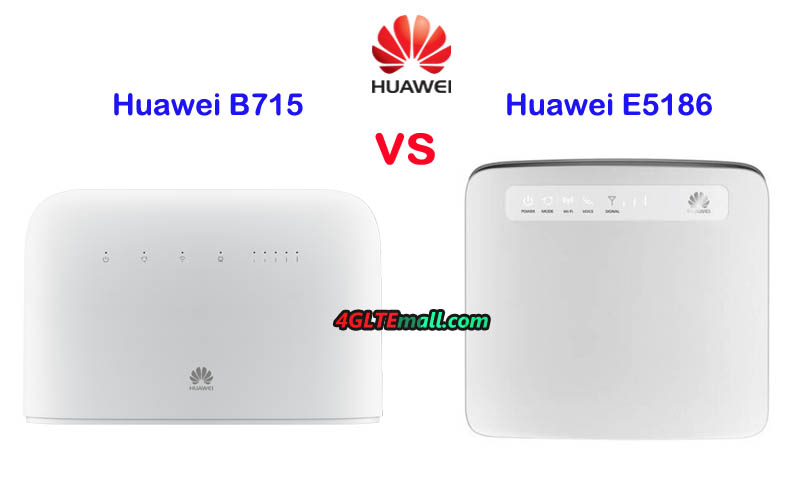
Appearance and Interfaces
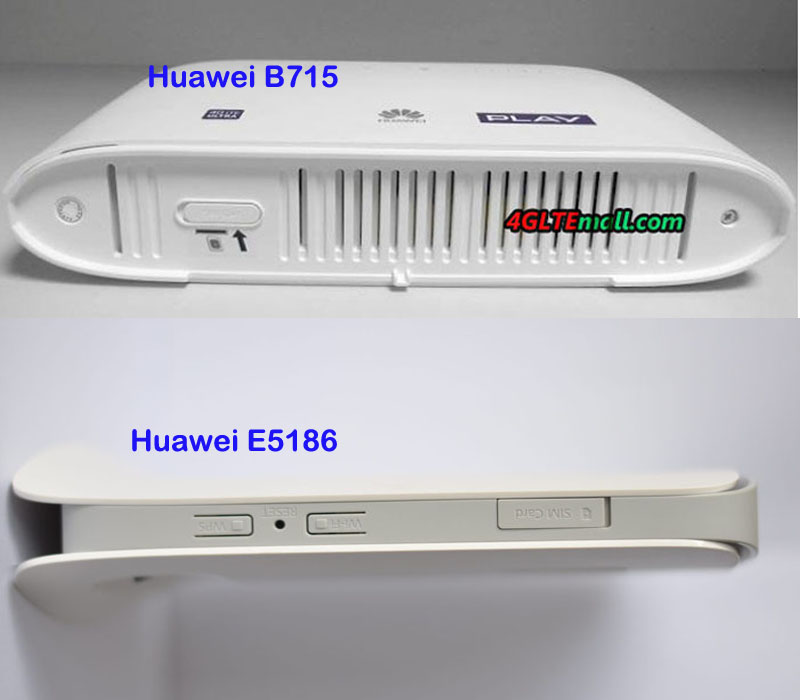
Since Huawei LTE CPE E5186 was popular in Europe and Australia in past two years, many people may know it well. Like many other Huawei stationary routers, there are few indicators on the front, such as Power, Mode, WiFi, Voice, Signal. And Huawei logo is in the middle front face. On the back, there are 4 LAN ports (one for LAN/WAN), two RJ11 Telephone port, and USB 2.0 port available. The power switch on/off button is also lined with the interfaces. Huawei Router B715 also has 4 LAN ports (One for LAN/WAN), but it has only one telephone port with the USB 2.0 port. They both use Micro SIM card size. The difference is that the SIM card of Huawei E5186 is located at the edge side while Huawei B715 router has the SIM card slot at the bottom. And they both have two SMA connectors for an external antenna. If you would buy 4G LTE Antenna with two SMA connectors, you can switch the internal antenna to external antenna in the web interface.
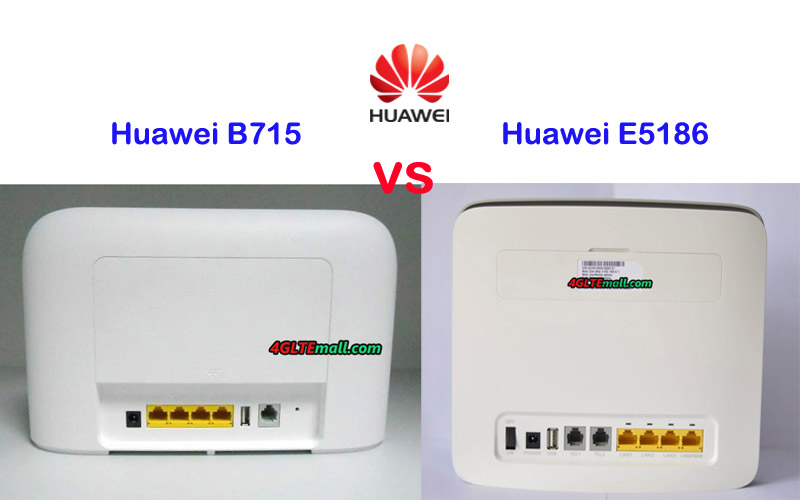
Specs and variant models
The predecessor Huawei B593 LTE router has more than 10 variant models. Unlike Huawei 4G CPE B593, Huawei E5186 has two variant models: Huawei E5186s-61a and E5186s-22a, even though it’s available for two years. The Huawei B715 was presented to market since the end of 2017, so it has only one sub-model Huawei B715s-23c. In the table below, you will see the details specs and features of Huawei B715 and E5186:
| Model | Huawei B715s-23c | Huawei E5186s-22a/E5186s-61a |
| Product type | LTE WiFi Router | LTE WiFi Router |
| Category | LTE Cat.9 | LTE Cat.6 |
| Chipset | ? | HiSilicon LTE Cat6 Chipset |
| Data rates | DL 450Mbps/UL 50Mbps | DL 300Mbps/UL 50Mbps |
| Supported 4G LTE frequency bands | LTE B1, B3, B7, B8, B20, B28, B32, B38 | E5186s-22a: Band 1/3/7/8/20/38 E5186s-61a: Band 3/7/28/40 |
| WLAN | 802.11a/b/g/n/ac, dual-band 2.4GHz & 5GHz | 802.11a/b/g/n/ac, dual-band 2.4GHz & 5GHz |
| Max support users | 64 users | 64 users |
| MIMO | 4 X 4 MIMO | 2 x 2 MIMO |
| Connector for external antenna | Two, SMA-female jacks | Two, SMA-female jacks |
| App management | Huawei Hilink APP | Huawei Hilink APP |
| SIM type | Micro SIM | Micro SIM |
| Battery | NO | NO |
| Dimensions | 240mm × 448mm × 47mm | 190 mm × 200 mm × 32 mm |
| Interfaces | * 1 x power adapter port * 3 x LAN port(45) * 1 x LAN/WAN port (45) * 1 x telephone port(RJ11) * Two external LTE antenna ports (SMA-J1.5) * One micro-SIM card slot * 1 x USB 2.0 port | * 3 x LAN port(45) * 1 x LAN/WAN port (45) * 2 x telephone port(RJ11) * Two external LTE antenna ports (SMA-J1.5) * One micro-SIM card slot * 1 x USB 2.0 port |
| Datasheet | Huawei B715 Datasheet(PDF) | Huawei E5186 Datasheet(PDF) |
| User Manual | Huawei B715 User Manual(PDF) | Huawei E5186 User Manual(PDF) |
| Other features | VPN, VoLTE, IPv4 /IPv6 dual stack, DMZ, Port forwarding | Firewall, CS Voice, VoIP, TR069 Remote Management, HTTP Online Upgrade, QoS, USB Share, UPnP, IPV6, DLNA, Fax, Print, VPN |
| Price | 399.00USD | 259.00USD |
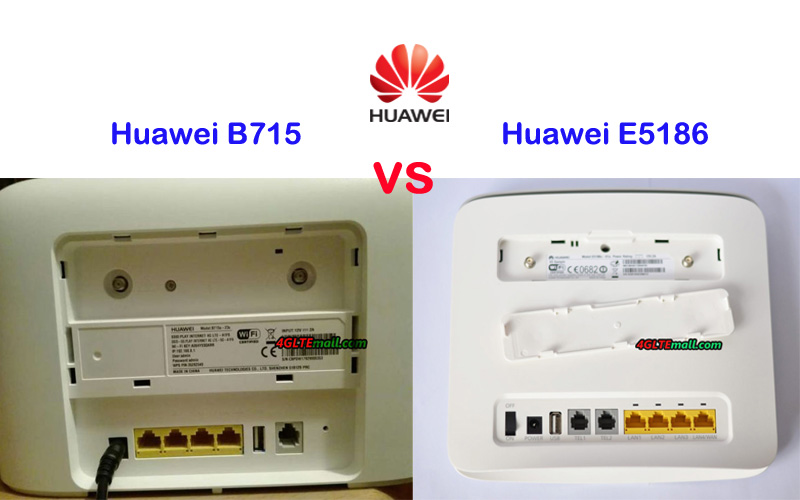
Conclusion
It’s obvious to see that the Huawei B715s-23c router is more advanced than Huawei E5186. The Huawei E5186 supports LTE category 6 technology which could achieve download speed up to 300Mbps, which is good for most people in daily life. However, the more advanced Huawei B715 would support peak download speed up to 450Mbps, which is 1.5 times faster than that of E5186. Although we didn’t know the chipset model of Huawei B715, the Huawei B715 seems powerful on the LTE technology, including carrier aggregation, 4 x 4 MIMO, TDD&FDD networks support.
So if you want to buy a better Huawei LTE-A router, it’s no doubt that Huawei B715 is the right model. However, as we said, the Huawei E5186 is enough for most cases in daily life or small office. With budget price, if you want to get a decent router without a high price, Huawei E5186 is highly recommended. It’s popular in the past two years and gains high praise from thousands of users worldwide.