
[PR]上記の広告は3ヶ月以上新規記事投稿のないブログに表示されています。新しい記事を書く事で広告が消えます。
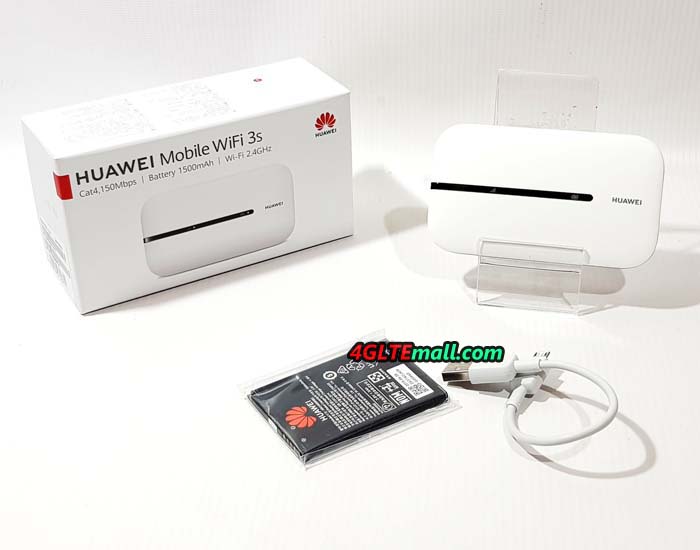
The Huawei Mobile WiFi 3s has recently become a very affordable mobile LTE router in European countries. The Huawei MiFi 3S, which is also marketed under the model name Huawei E5576-320, can be used with all SIM cards.
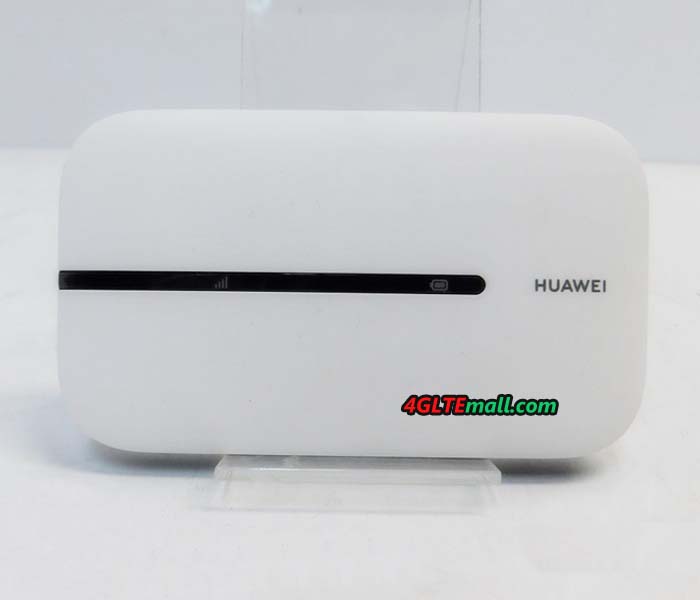
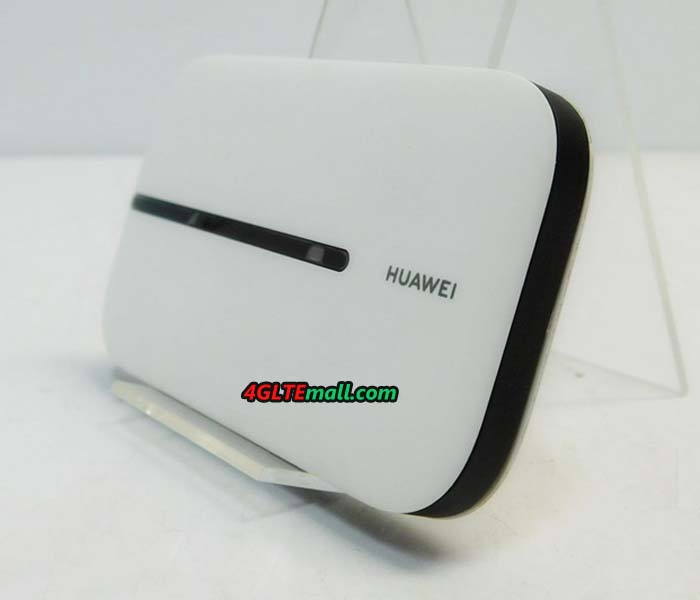
Of course, you shouldn't expect high-end equipment at the very reasonable price. For example, there is no display on the front - this is often standard for more expensive 4G LTE hotspots. For this, the Huawei E5576 is very small and handy and can be perfectly carried in your pocket or in your backpack.
The Huawei E5576 is made entirely of plastic and available in black and white. In addition to the device itself, the scope of delivery also includes an approximately ten centimeter long USB to micro-USB cable, a 1,500 mAh battery, a quick start guide and a warranty card. There is no need for a power pack to charge the battery, but you can use any existing USB power pack.
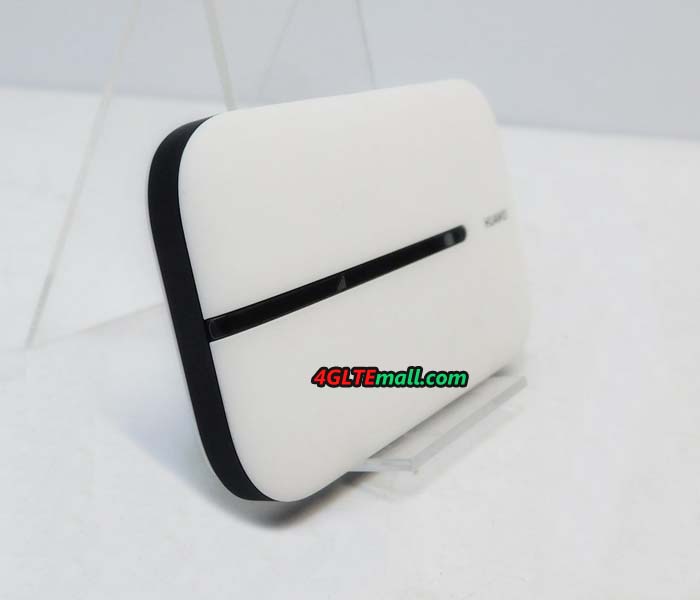
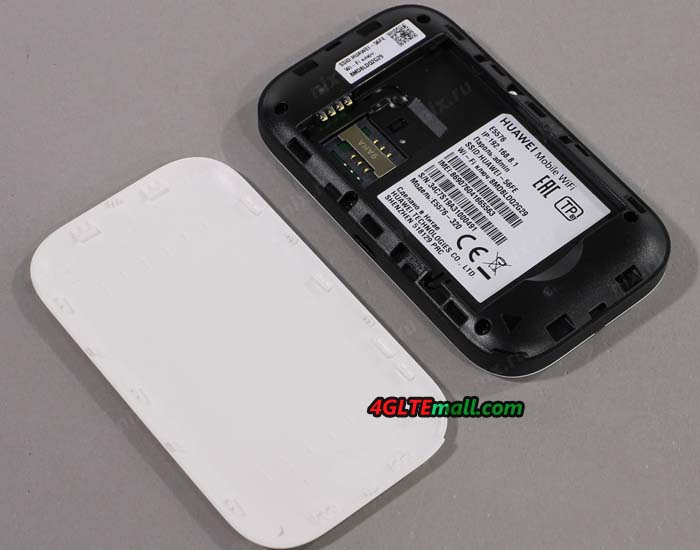
The Huawei E5576 Mobile WiFi 3s hotspot makes a good first impression. The material used feels good and the button for switching on and off on the top has a good pressure point. The back can be easily removed to insert the SIM card (Mini-SIM format, 2FF) and the battery.
At first glance, it is negative that Huawei has not installed any connections for an external cellular antenna and continues to rely on the micro USB standard. USB Type C would have been appropriate here in 2020.
Unlimited SIM cards from Telekom and O2 were used for the test. Unfortunately, the performance in the LTE network via WLAN was very poor. Tested with several end devices, the speed rarely exceeded 20 Mbit/s. In the peak, about 23 Mbit/s in the downlink and about 33 Mbit/s in the uplink could be reached via WLAN.
LTE Modem In the Test
The speeds were significantly better when the Huawei E5576 was connected via USB. Well over 100 Mbit/s in the downlink and almost 50 Mbit/s in the uplink were possible. These measurement results show that the modem can deliver high speeds, but the bottleneck is to be found in the weak WLAN module. In comparison with an expensive high-end LTE hotspot such as the Huawei E5788 and Netgear Nighthawk M2, it also shows that the LTE network can do much more than the small Huawei E5576 gets out of the connection.
The minimum latency (ping) was always well below 20 milliseconds - the small Huawei E5576 hotspot is in no way inferior to much more expensive end devices.
The Huawei E5576 can be used in almost every UMTS and LTE network in Europe, since all important frequency ranges are supported. Incidentally, the modem is not capable of 2G / GSM, which, given the now very good LTE networks, is no longer tragic. The following frequency ranges are supported in detail:
On other continents such as Asia, North America or South America, you have to be prepared for the fact that many LTE networks cannot be used or can only be used to a very limited extent. The Huawei E5576 does not support the frequency bands required for this.
WLAN in the test
The WLAN module of the Huawei E5576 Mobile WiFi 3s works exclusively in the frequency range around 2.4 GHz and can supply up to 16 devices with a WLAN connection at the same time. The WLAN name and password can of course be assigned individually.
Unfortunately, the WLAN module did not do well in the test. The connection was always stable, but as described in the LTE modem test, it was relatively slow. Often, only 73 Mbit/s gross data rate was displayed on the MacBook. The speed is sufficient for normal surfing and video streaming, but the maximum LTE speed of 150 Mbit/s cannot be reached via WLAN. The range was also quite short, there shouldn't be more than one wall between the Huawei E5576 and the end device.
For example, the channel bandwidth can be set via the advanced WLAN settings. There is also the option of setting up an automatic standby mode for the WLAN network when no devices are connected. This helps to save energy.
It is easy to set up a second SSID (guest access). The name, the password and the desired duration for the guest access can be set individually. Huawei offers the options unlimited, 1 day and 4 hours for the duration of guest access.
The WiFi extender is a very interesting function. This means that you can use a different WiFi network than Internet access, for example in a hotel, at a campsite or on the train. This helps to save mobile data volume. There is no noticeable difference for the devices connected to the Huawei E5576, because the WLAN network of the E5576 will of course remain as usual. The WLAN extender is configured either via the web interface or via an app.
Operation and software
The Huawei E5576-320 LTE router can be operated either via the Huawei Smart Home app (for Android and iOS) or via the browser web interface. Right from the first setup, the software offers to change the WiFi password and admin password. Huawei has noted the standard WLAN password both under the battery cover and in the battery compartment.
Since there is no display for operation directly on the device, you have to rely on the corresponding LEDs on the front. These shine in different colors depending on the condition of the battery or depending on the reception and are easy to read. Green LEDs indicate good condition, yellow LEDs indicate poor reception or a weak battery.
Both the web interface and the Huawei Smart Home app offer an attractive, functional design and are easy to use. The web interface can be called up with a device connected to the router via the IP address 192.168.8.1 in the browser. If you use the app, you do not need to enter the IP address. The app is sufficient for most settings, only a few menu items can only be accessed via the web interface, such as the 3G-only mode.
The software of the Huawei mobile WiFi router can be updated via the web interface. If an update is available, the router automatically reports via the web interface.
Battery for up to 6 hours of operation
The battery has a capacity of 1,500 mAh and can be changed by the user without any problems - quite a special feature in today's world. The operating time is specified by Huawei as about 6 hours, this value was confirmed in the test. Depending on the number of connected devices, the operating time may decrease somewhat, but if necessary you can simply buy a replacement battery and thus extend the runtime.
Charging the battery takes about an hour in the test. Operation without an inserted battery, i.e. only via USB power supply, was not possible in the test. The two LEDs flashed red.
Conclusion: good and cheap
The Huawei E5576 Mobile WiFi 3s is one of the cheapest mobile LTE routers. At the cheap price you get a reasonable performance. The well-designed software and simple operation were particularly convincing. The compact design and the removable battery are also positive.
You have to cut back on the weak WLAN performance and the comparatively slow LTE modem. You also have to do without comfort functions such as a display, connections for an external antenna or a memory card. If you don't mind, the Huawei E5576 Mobile WiFi 3s is an LTE hotspot with a good price-performance ratio, which is suitable for normal surfing, checking e-mails and also for occasional video streaming.
TP-link Archer MR400 is a powerful 3G/4G router from TP-Link, designed for users who need high data transfer speed in a WiFi network. This model combines support for most popular 3G and LTE mobile Internet standards with a high-speed dual-band WiFi module that supports the 802.11ac protocol. The line of TP-Link Archer wireless routers has won great popularity among users due to the low price and excellent technical characteristics. The Archer MR400 is the older model of TP-Link 3G/4G routers that is ideal for use in an office, apartment, country house, or any other place where you need to provide quick access to the mobile Internet for a large number of wireless devices.
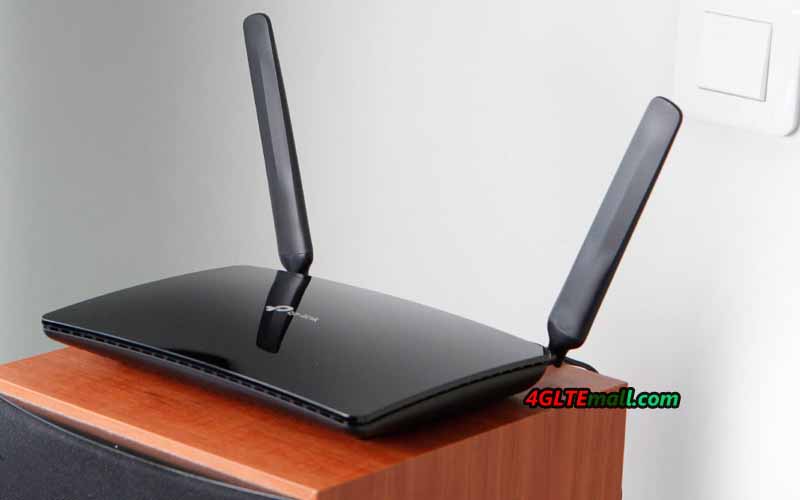
TP-Link Archer MR400 Specifications
Due to the configuration of the MIMO 3x3 antennas in the 2.4 GHz band and the MIMO 2x2 in the 5 GHz band, the Archer MR400 provides a total transfer rate of up to 1350 Mbps (450 Mbps in the 2.4 GHz network and 867 Mbps in the 5 GHz). For comparison: the predecessor Archer MR200 model is limited to a speed of 300 Mbit/s in the 2.4 GHz network and 433 Mbps in the 5 GHz network.
A high-performance WiFi module supports up to 64 users. It is recommended to connect to the 2.4 GHz network equipment that does not need high speed, as well as obsolete devices that do not support the 802.11ac protocol. At the same time, it's best to connect the demanding bandwidth to the 5 GHz network: televisions, game consoles, wireless storage devices, etc. Using the innovative MU-MIMO technology allows us to unleash the full potential of the WiFi 802.11ac standard and provide the maximum data transfer rate with simultaneous connection to a network of several clients.
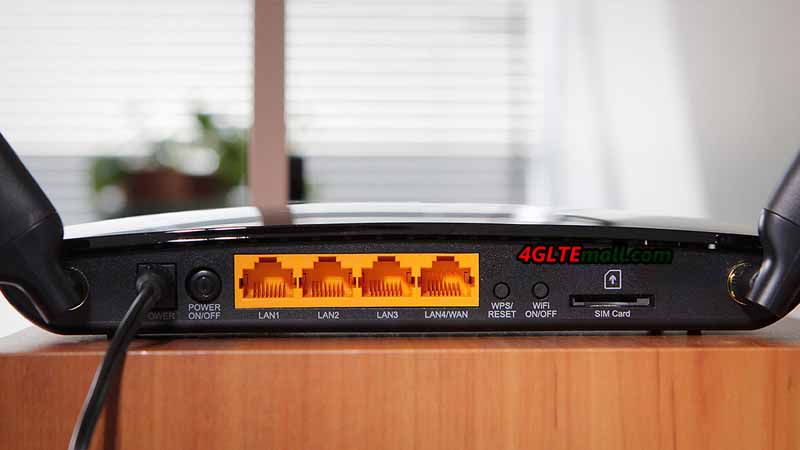
Archer MR400 is made in a stylish black case and supports the wall mount. A WPS button is also available on the back of the LTE router for quick connection of WiFi devices.
The TP-link router is equipped with one SIM card slot and supports all common cellular standards in Europe, including FDD-LTE in the frequency ranges of 800, 1800 and 2600 MHz, TDD-LTE in the 2600 MHz band and 3G at 900 and 2100 MHz. The maximum speed in 4G networks is 150 Mbit/s for reception and 50 Mbit/s for transmission (LTE Cat. 4). The MR400 Router also supports 2G-Internet and other broadband Internet standards used in different countries of the world.
To receive a mobile signal, the kit includes two small detachable LTE antennas with a small gain. In the case of a weak or uncertain input signal, more powerful directional antennas (sold separately) can be connected through the SMA connectors to the MR400.
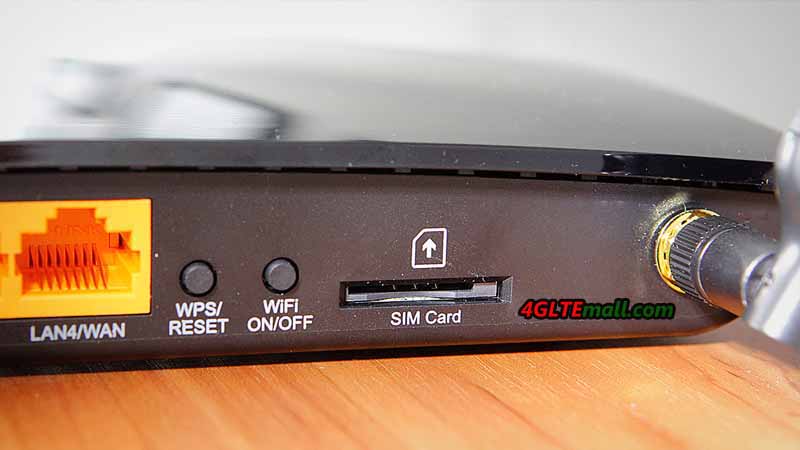
TP-Link Archer MR400 Interfaces
With the router, the adapters of changing Micro to Standard or NANO to Standard are included, which allow installing a SIM card of any format into the router. In addition to the SIM card slot, there are 4 Ethernet ports (10/100 Mbps) on the rear panel: 3 LAN ports and one switchable WAN / LAN port. Thus, the router can be connected to the Internet not only through a mobile connection but also through a normal cable from the provider. The drawbacks of the model include the absence of gigabit ports, which reduces the maximum speed of data exchange between wired and wireless devices in the network.
TP-Link Archer MR400 Settings
The configuration of the router is carried out via the web interface or the proprietary TP-Link Tether application. At the disposal of users, there are various settings of mobile connection and local network. The Archer MR400 administration panel contains all the parameters familiar to home routers, as well as some additional functions: two guest networks (2.4 and 5 GHz), parental control, QoS (bandwidth control), dynamic DNS (DynDNS, NO-IP), VPN (PPTP, L2TP, IPSec), NAT, IPv6, DHCP, protection against DoS attacks, filtering over IP and MAC addresses, etc.
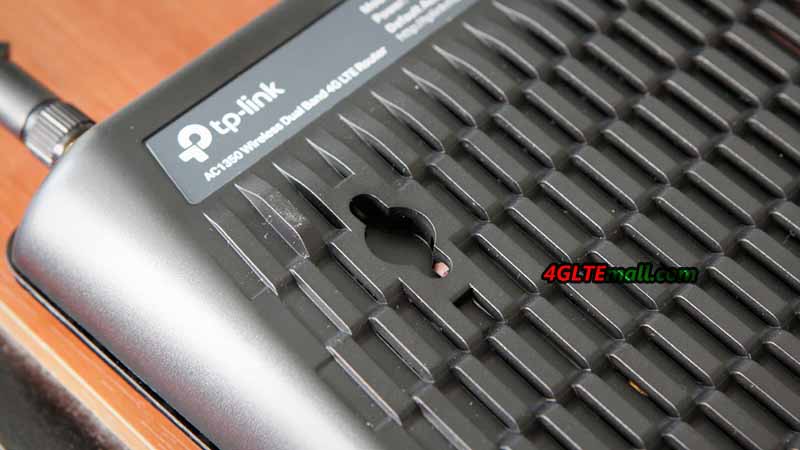
The router is very easy to manage and does not require special skills for customization. In most cases, it is enough to install a working SIM card in the router and connect it to the power network: the mobile Internet and the WiFi network will work by themselves. With the Archer MR400, you can connect a large number of wireless devices to the 3G/ 4G Internet and ensure the maximum speed of data exchange in the WiFi network.
General Review of Archer MR400 Specifications:
For most unprofessional users, it would be a challenging thing to buy a Huawei WiFi router with Ethernet port. Especially, there are many Huawei LTE Routers available in the market, which would make the selection harder. Huawei B525 and Huawei B618 are two latest LTE advanced routers, somebody may be interested in the two routers. If you don’t know what’s the difference between the Huawei B618 and B525 router. In this article, you will find the answer. And if you want to buy Huawei B525 router or Huawei B618 router, you may get some reference.
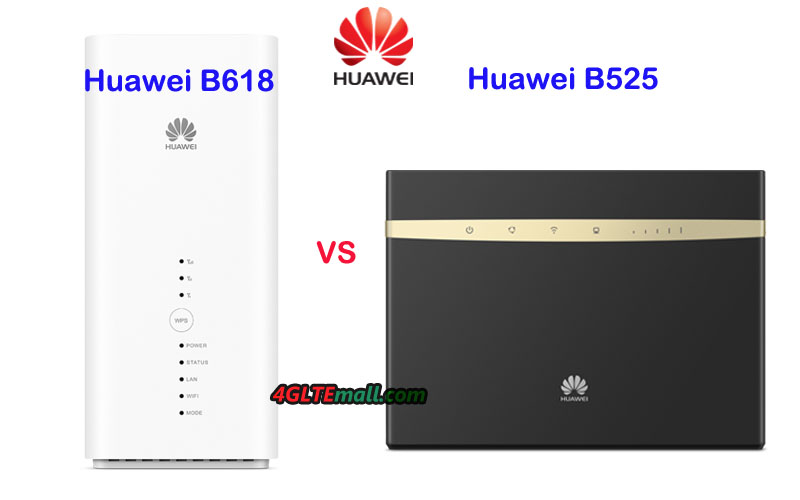
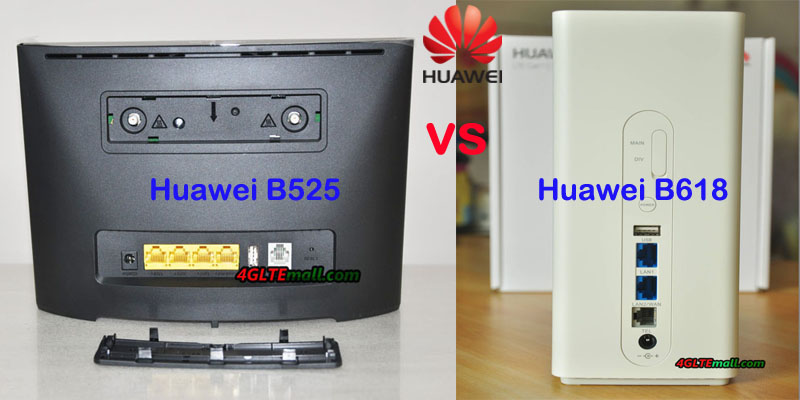
Appearance Huawei B525 WiFi router was available earlier than B618 LTE CPE, and it’s technically similar to its predecessor Huawei E5186 WiFi router. The shape of Huawei B525 is in the shape of a traditional stationary wireless router, which could stand on the desktop, on the front, there are some LED indicators and there are 4 LAN ports on the back for an Ethernet connection to PC or other terminals. Two connectors are available on the top back of the router for connecting external 4G/LTE antennas. One RJ11 port for phone and one USB 2.0 port for data sharing are available.
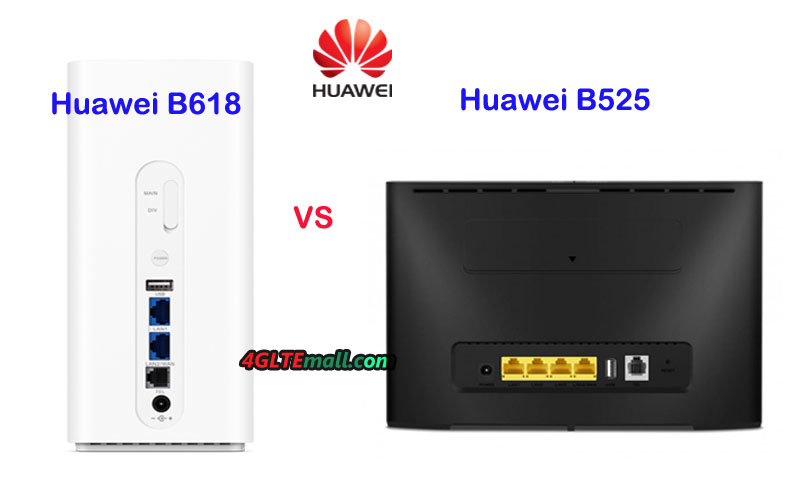
The Huawei 4G Router B618 is not like the common router, it’s in a shape of the cube. However, the LED indicators and the Ethernet ports are still available but with different quantity. Huawei B618 Router has two LAN ports(One for LAN & WAN). The RJ11 port for telephone and USB 2.0 port are still available. The difference is that the Huawei B525 has two antenna connectors in the type of SMA while B618 LTE CPE has two TS-9 connectors, which is usually available for a Huawei LTE USB modem. What’s more, the two routers both use Micro SIM card and the SIM card slots are located at the bottom of the two routers.
Specifications From the appearance, you may not really make a decision which one is better to select. The Huawei B525 specs and Huawei B618 specs are the key difference, which may influence the daily usage. This time, we take Huawei B618s-22d as an example. In below the table, you will see the difference of the specs difference:
| Model | Huawei B618 | Huawei B525 |
| Product type | LTE WiFi Router | LTE WiFi Router |
| Category | LTE Cat.9/ Cat.11 | LTE Cat.6 |
| Chipset | HiSilicon Balong 750 | HiSilicon LTE Cat6 Chipset |
| Data rates | DL 600Mbps/UL 100Mbps | DL 300Mbps/UL 50Mbps |
| Supported 4G LTE frequency bands | B618s-22d: Band 1/3/7/8/20/38 B618s-65d: 1/3/5/7/8/28/40 | B525s-23a: Band 1/3/7/8/20/32/38 B525s-65a: Band 1/3/4/5/7/8/20/19/26/28/32/38/40/41 |
| WLAN | 802.11a/b/g/n/ac, dual-band 2.4GHz & 5GHz | 802.11a/b/g/n/ac, dual-band 2.4GHz & 5GHz |
| Max supported users | 64 users | 64 users |
| MIMO | 4 X 4 MIMO | 2 x 2 MIMO |
| Connector for external antenna | Two, TS-9 jacks | Two, SMA-female jacks |
| Buy Antenna | Huawei B618 Antenna | Huawei B525 external antenna |
| App management | Huawei Hilink APP | Huawei Hilink APP |
| SIM Size | Micro SIM | Micro SIM |
| Battery | NO | NO |
| Dimensions | 95 × 95 × 208mm | 163 x 52 x 226 mm |
| Interfaces | * 1 x LAN port(45) * 1 x LAN/WAN port (45) * 1 x telephone port(RJ11) * 1 x USB 2.0 port | * 3 x LAN port(45) * 1 x LAN/WAN port (45) * 2 x telephone port(RJ11) * Two external LTE antenna ports (SMA-J1.5) * One micro-SIM card slot * 1 x USB 2.0 port |
| Datasheet | Huawei B618 Datasheet | Huawei B525 Datasheet(PDF) |
| User Manual | Huawei B618 User Manual | Huawei B525 User Manual(PDF) |
| Other features | DHCP Server, DNS RELAY and NAT, VoLTE, IPv4 /IPv6 dual stack | Firewall, CS Voice, VoIP, TR069 Remote Management, HTTP Online Upgrade, QoS, USB Share, UPnP, IPV6, DLNA, Fax, Print, VPN |
| Firmware download | Huawei B618 firmware | Huawei B525 firmware |
| Driver | Huawei B618 driver | Huawei B525 driver |
| Reviews | Huawei B618s-22d Review | Huawei B525 Review |
| Price/USD | 449.00USD | 259.00USD |
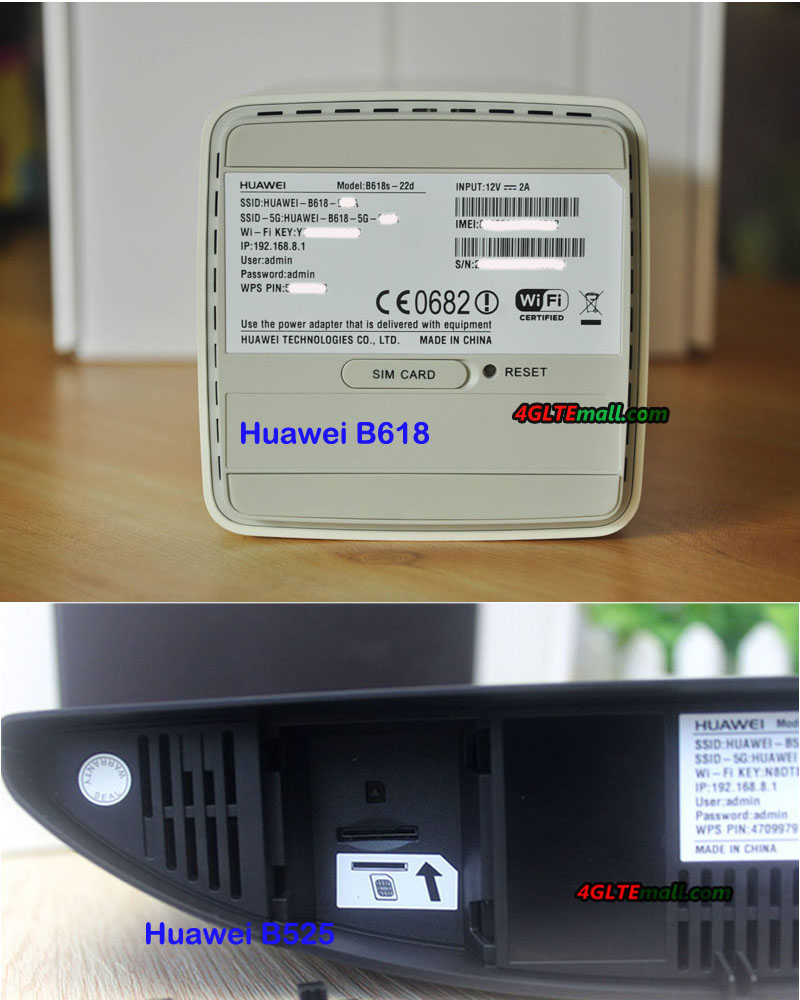
Conclusion From the specs, we can see the Huawei B618 4G Router is more advanced for high-level LTE network. With more advanced technologies, Huawei B618 could support faster download speed and upload speed, which is almost double of that of Huawei B525. The Huawei B525 has more Ethernet port for connection. But the Huawei B618 and B525 both could support maximum up to 64 wireless users, which would be enough for most cases. Currently, most of the devices would connect via WiFi rather than Ethernet port. If you prefer to have more Ethernet ports, Huawei B525 may be good. Frankly speaking, Huawei B525 is good enough for our daily life internet demand at home for a family or in office for a small group.
As a top and latest new 4G LTE router, Huawei B618 is a future-proof home router. At least, before 5G router comes out, you will never worry about it’s out of date. However, the advanced feature makes it not in cheap price. If you want a budget router, Huawei B525 would be better.
Huawei B618 and Huawei B525 router are both Huawei WiFi router with Ethernet port. As the latest released wireless router, many people are not quite familiar with the two routers. For those who want to buy a router from the LTE CPE B618 and B525, they may want to ask: What’s the difference between the Huawei B525 and B618 router? Which one is better to use at home or in an office? We will review the difference from the aspect of appearance, interfaces, variant model, specs and other features to conclude for the buyers.
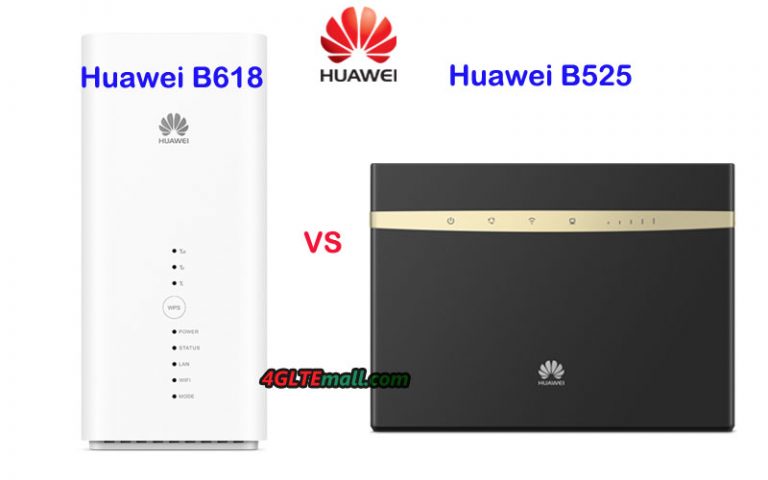
Huawei B618 vs B525 Router Appearance
The Huawei 4G Router B618 is not like the common router, it’s in a shape of cube. However, the LED indicators and the Ethernet ports are still available but with different quantity. Huawei B618 Router has two LAN ports(One for LAN & WAN). The RJ11 port for telephone and USB 2.0 port are still available. The difference is that the Huawei B525 has two antenna connectors in the type of SMA while B618 LTE CPE has two TS-9 connectors, which is usually available for a Huawei LTE USB modem. What’s more, the two routers both use Micro SIM card and the SIM card slots are located at the bottom of the two routers.
Huawei B525 WiFi router was available earlier than B618 LTE CPE, and it’s technically similar to its predecessor Huawei E5186 WiFi router. The shape of Huawei B525 is in the shape of traditional stationary wireless router, which could stand on the desktop, on the front, there are some LED indicators and there are 4 LAN ports on the back for Ethernet connection to PC or other terminals. Two connectors are available on the top back of the router for connecting external 4G/LTE antennas. One RJ11 port for phone and one USB 2.0 port for data sharing are available.
Huawei B618 vs B525 Specifications
From the appearance, you may not really make a decision which one is better to select. The Huawei B525 specs and Huawei B618 specs are the key difference, which may influence the daily usage. This time, we take Huawei B618s-22d as example. In below the table, you will see the difference of the specs difference:
| Model | Huawei B525 | Huawei B618 |
| Product type | LTE WiFi Router | LTE WiFi Router |
| Category | LTE Cat.6 | LTE Cat.9/ Cat.11 |
| Chipset | HiSilicon LTE Cat6 Chipset | HiSilicon Balong 750 |
| Data rates | DL 300Mbps/UL 50Mbps | DL 600Mbps/UL 100Mbps |
| Supported 4G LTE frequency bands | B525s-23a: Band 1/3/7/8/20/32/38 B525s-65a: Band 1/3/4/5/7/8/20/19/26/28/32/38/40/41 | B618s-22d: Band 1/3/7/8/20/38 B618s-65d: 1/3/5/7/8/28/40 |
| WLAN | 802.11a/b/g/n/ac, dual-band 2.4GHz & 5GHz | 802.11a/b/g/n/ac, dual-band 2.4GHz & 5GHz |
| Max supported users | 64 users | 64 users |
| MIMO | 2 x 2 MIMO | 4 X 4 MIMO |
| Connector for external antenna | Two, SMA-female jacks | Two, TS-9 jacks |
| Buy Antenna | Huawei B525 external antenna | Huawei B618 Antenna |
| App management | Huawei Hilink APP | Huawei Hilink APP |
| SIM Size | Micro SIM | Micro SIM |
| Battery | NO | NO |
| Dimensions | 163 x 52 x 226 mm | 95 × 95 × 208mm |
| Interfaces | * 3 x LAN port(45) * 1 x LAN/WAN port (45) * 2 x telephone port(RJ11) * Two external LTE antenna ports (SMA-J1.5) * One micro-SIM card slot * 1 x USB 2.0 port | * 1 x LAN port(45) * 1 x LAN/WAN port (45) * 1 x telephone port(RJ11) * 1 x USB 2.0 port |
| Datasheet | Huawei B525 Datasheet(PDF) | Huawei B618 Datasheet |
| User Manual | Huawei B525 User Manual(PDF) | Huawei B618 User Manual |
| Other features | Firewall, CS Voice, VoIP, TR069 Remote Management, HTTP Online Upgrade, QoS, USB Share, UPnP, IPV6, DLNA, Fax, Print, VPN | DHCP Server, DNS RELAY and NAT, VoLTE, IPv4 /IPv6 dual stack |
| Reviews | Huawei B525 Review | Huawei B618s-22d Review |
| Price/USD | 259.00USD | 449.00USD |
Conclusion In the specs, we can see the Huawei B618 4G Router is more advanced LTE router with support of LTE category 11. With more advanced technologies, Huawei B618 could support faster download speed up to 600Mbps, which is almost double of that of Huawei B525. The Huawei B525 has more Ethernet port for connection. But the Huawei B618 and B525 both could support maximum up to 64 wireless users, which would be enough for most cases. Currently, most of the devices would connect via WiFi rather than Ethernet port. If you will connect to the router mostly vis Ethernet ports, Huawei B525 may be the right one. However, if your devices will access internet through WiFi, you may consider the Huawei B618. And Huawei B618 is a future-proof home router with the advanced features.
However, the advanced Huawei B618 router with a higher price than that of Huawei B525. Frankly speaking, the Huawei B525 could work well for most cases in our daily lives. So with the budget price, Huawei B525 would be great for most people.